Personalised Led Signs combine light, digital control, and tailored visual communication. They can display a business name, welcome message, logo, price, or changing announcement. Unlike printed boards, these signs use light-emitting diodes arranged in pixels, modules, or flexible strips. A controller sends electrical signals to each LED. The selected diodes then produce specific colours and brightness levels.
The process is more practical than mysterious. A user creates content through software, a mobile application, or a connected control panel. The system stores that content and transmits it to the sign. Red, green, and blue LEDs mix their intensity to create many visible colours. Sensors may adjust brightness when daylight fades. A customer might see crisp white lettering at noon, then softer amber text beside a shop entrance after sunset.
Industry research shows why this technology is gaining attention. Fortune Business Insights valued the global LED display market at approximately $7.32 billion in 2023. Its report projects growth to about $13.47 billion by 2032. Grand View Research also identifies expanding demand for energy-efficient LED solutions across commercial environments. However, these reports use different market definitions. Their figures should not be treated as direct sales data for Personalised Led Signs.
That distinction matters. A small illuminated nameplate and a large advertising screen do not perform the same job. Pixel pitch, viewing distance, weather protection, power use, and content management all affect the result. Bright is not always better. Poorly balanced brightness can reduce readability and waste energy. This guide examines how Personalised Led Signs work, where they fit, and what buyers should question before installation.
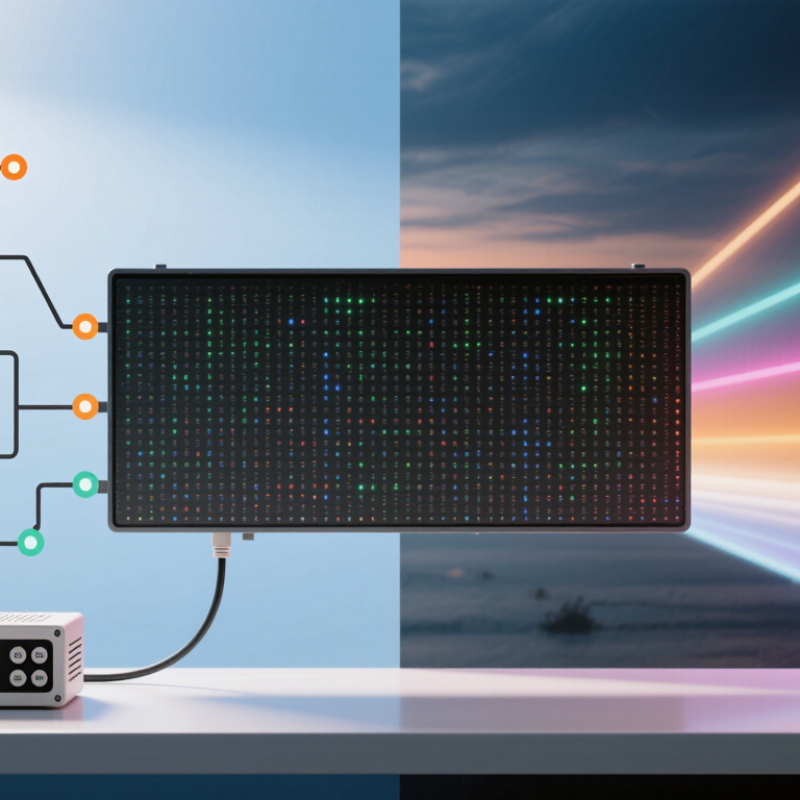
Personalised LED signs are digital displays created with custom text, symbols, colours, or simple graphics. They use light-emitting diodes arranged in rows, panels, or individual pixels. A controller sends electrical signals to these pixels. The pixels then produce visible characters and images. In practical terms, the sign works like a programmable message board.
The core feature is content flexibility. Users can change wording, brightness, colour, and display timing through a control system. Some signs use buttons, remote controls, wired connections, or secure software. Brightness settings matter because a sign viewed indoors needs less intensity than one facing daylight. Clear contrast also improves readability from a distance. A well-designed sign should remain legible during movement, glare, and changing weather conditions.
Physical construction is equally important. A durable enclosure can protect the electronics from dust, moisture, and temperature changes. Installation experience shows that poor cable routing often causes avoidable maintenance problems. Power requirements must be checked before installation. Otherwise, flickering or unstable performance may appear. Personalisation has limits, too. Overly detailed graphics can look attractive on a screen but become unclear on the actual display. Testing the sign from its intended viewing distance is a small step, yet it is frequently overlooked.
Personalised LED signs combine several engineered parts rather than a single glowing panel. The LED modules create light, usually through red, green, and blue diodes. A controller adjusts each diode’s brightness to produce text, logos, or moving images. A power supply then converts incoming electricity into the stable, low-voltage current the modules require.
The cabinet provides structure and protection. Aluminium frames are common because they reduce weight and help release heat. Front covers may use acrylic or polycarbonate, while diffusers soften harsh pixels. Ventilation matters. Excess heat can shorten LED life and distort colour. The U.S. Department of Energy’s 2023 Solid-State Lighting R&D Opportunities report identifies efficiency, thermal control, and colour quality as continuing industry priorities. Those concerns appear in real installations, especially signs running outdoors for long hours.
Software is another key component. It sends schedules and artwork to the controller through wired or wireless connections. Sensors can adjust brightness when daylight fades, although automatic settings are not always accurate. A 2023 Grand View Research report estimated the global digital signage market at more than 27 billion U.S. dollars in 2022, showing strong demand for programmable displays. Yet market growth does not guarantee a good sign. Poor pixel spacing, weak weather sealing, or an underrated power supply can create dark patches and flicker. My practical view is simple: test the sign at its actual viewing distance, not only on a workbench.
Personalised LED signs turn typed words into visible light. Their message begins in control software or a mobile interface. A user selects letters, colours, brightness, and display timing. The system then converts those choices into digital instructions. A controller sends the instructions to LED modules arranged in rows and columns. Each LED acts like a tiny pixel. Together, thousands of pixels form letters, symbols, or simple animations.
The controller manages more than text. It sets refresh rates, colour intensity, transition speed, and playback order. Some signs receive updates through wired networks, Wi-Fi, or removable storage. Others use sensors to adjust brightness when daylight fades. This matters outside a workshop. A message that looks sharp indoors may appear weak under direct sunlight. Excessive brightness can also create glare and reduce readability at night.
From practical use, clear spacing often matters more than decorative effects. Short phrases remain readable from moving vehicles or across a busy reception area. However, results are not always perfect. Different viewing angles can change perceived colour, and poor content may look jagged. Power interruptions can disrupt scheduled messages. Testing the sign from its real viewing distance helps reveal these problems. I would also check spelling on the physical display, not only on the screen. That small step prevents an embarrassing mistake.
Personalised LED signs use light-emitting diodes arranged behind acrylic, metal, or shaped lettering. A controller sends low-voltage power through selected sections, creating steady light, fading effects, or colour changes. During practical installation, the sign’s wiring, ventilation, and mounting surface matter as much as its appearance. Poor spacing can cause dark patches. Moisture can also shorten component life.
Common design options include names, short phrases, symbols, outlines, and layered lettering. Customers can choose warm white, cool white, or changing colours. Letter thickness, edge lighting, backlighting, and front-facing illumination create different visual results. For example, warm light suits a quiet reception area, while brighter colours attract attention in a busy display space. Customisation may involve digital mock-ups, hand-drawn logos, cut acrylic shapes, and adjustable brightness controls. A design may look excellent on a screen but feel too bright in a real room. That mistake is easy to make.
Tips: Measure the wall before approving artwork. Keep important text readable from its expected viewing distance. Ask for a wiring diagram and test the brightness at night. Use suitable materials for indoor or outdoor conditions. Leave space around the sign for cleaning and future repairs. I once underestimated cable access, and the final installation needed an avoidable adjustment. Small planning details often protect the finish.
Personalised LED signs combine light-emitting diodes, a power supply, and a programmable controller. Each diode converts electrical current into light, while a diffuser shapes brightness and reduces glare. Text, logos, colours, and animations are stored in the controller. Users can update them through wired controls or wireless software. Simple in theory.
Their practical value appears in reception areas, cafés, retail windows, event spaces, and wayfinding displays. A sign can show opening hours, queue instructions, or a short promotional message.
The U.S. Department of Energy reports that LED lighting can use at least 75% less energy and last up to 25 times longer than incandescent lighting. That difference matters for signs operating ten hours daily. However, energy savings depend on brightness, animation speed, and power-supply efficiency. A poorly configured sign can still waste electricity.
Maintenance starts with the installation environment. Dust on the diffuser makes colours look dull, especially under warm indoor lighting. Clean the surface with a soft, dry cloth, and avoid spraying liquid into seams. Check connectors every few months for looseness, heat marks, or flickering sections. Outdoor signs need sealed housings and suitable protection against moisture. IEC 60529 enclosure ratings help specify resistance to dust and water, but ratings do not replace regular inspection. In practice, failures often begin with neglected cables rather than LEDs. I would also review brightness settings seasonally; maximum output is rarely necessary at night.
LED modules create light from red, green, and blue diodes. A controller manages brightness, colours, text, and animations. A power supply provides stable, low-voltage electricity.
Software converts typed words into digital instructions. The controller sends these instructions to LED pixels arranged in rows and columns. Together, the pixels form letters, symbols, or simple moving images.
The cabinet supports the sign and protects its internal parts. Aluminium can reduce weight and help release heat. Front covers may use acrylic or polycarbonate materials.
Excess heat can shorten LED life and change colour accuracy. Ventilation helps hot air escape from the cabinet. Heat matters.
Sensors can reduce brightness when daylight fades. However, automatic settings may not always match real conditions. Manual checking remains useful, especially at night.
Clear spacing often matters more than decorative effects. Short phrases work better near roads or busy reception areas. Too many effects can make the message confusing.
A display can look sharp on a workbench but weak from across a room. Outdoor sunlight may reduce contrast and visibility. Test it outdoors.
Poor pixel spacing may create jagged letters or uneven visual details. Weak weather sealing can expose components to moisture. Power interruptions may stop scheduled messages or cause flicker.
Check spelling on the physical display, not only in the control software. View the sign from different angles and under changing light. I might still miss something, so a second check helps.
Personalised Led Signs are digital display systems designed to present customised words, symbols, images, or animated content in a clear and attention-grabbing format. Their main features include adjustable colours, brightness, text styles, layouts, and message schedules, allowing users to adapt the display for different spaces and purposes. Typical components include LED modules, a control board, power supply, protective casing, wiring, and software or a remote interface for creating and managing content.
These signs create messages by converting digital instructions into patterns of illuminated LEDs. The controller determines which individual lights turn on, their colour, and their timing, producing scrolling text, static notices, transitions, or simple graphics. Common customisation options include sign shape, size, mounting position, font, colour scheme, animation speed, and update method. Personalised Led Signs can be used for reception areas, retail displays, events, public information, and workplace communication. Regular cleaning, secure installation, ventilation checks, software updates, and inspections of cables and power connections help maintain reliable performance and prolong the sign’s service life.

Kexian